View & render · beta · Neovim 0.11+ · 122 commits
media.nvim
What is in this media file, one picture of it, and — a video or an audio file's speech, turned into text. ffprobe says how long, how big and in which codec; ffmpeg produces a poster frame, a contact sheet or a waveform as a PNG on disk; a local transcription engine turns the speech in it into a buffer, a .transcript.md sidecar, or SRT/VTT subtitles. :Media text turns any of the four into text with one verb — an image through images.nvim's OCR, a PDF through pdfport, audio and video through the transcription engine. Anything that can draw a picture can then show a video — which was, until now, everywhere just a size in bytes and the word "binary".
Connections
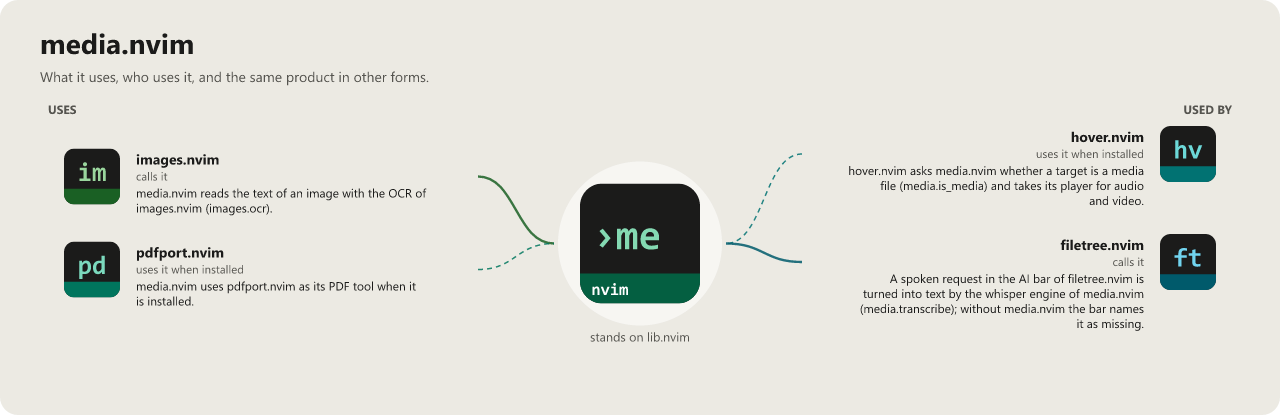
Tap the picture to open it at full size.
Install
{
  "WKDSteve/media.nvim",
  opts = {},
}
Beta stage — active development. This repository is past its first shape and in active use, but the surface is not frozen: breaking changes are still possible. Pin a commit or tag if you depend on it.
Documentation
Recent commits
- test sheets: a feature sheet for :Media window and :Media play
- fix player: an mpv that cannot be started is an error, not a raise
- test sheets: feature sheets for the audio pictures and for :Media transcribe
- fix transcribe: a whisper binary that cannot be started is an error, not a raise
- docs regenerate the connection pictures (optional loads through probe/safe/package.loaded)
- feat tree: a transcript another program writes or deletes gets its badge at once
- test sheets: the sheets name the acceptance task their judge and manual lines go to
- test sheets: the transcript badge in the tree gets a sheet of its own
Combos
- Hover preview stack
hover.nvim is the shared preview host; these hand it something to draw without it needing to know the format itself.